What the free Bible verse widget app includes: widgets, reminders, themes, favorites and streaks, plus exactly what Bible Widgets Premium adds on top.
October 13, 2026
·
3 min
Bible Widgets is free to download, and the free version includes the things most people install it for: Home Screen and Lock Screen widgets with basic customization, daily reminders, favorites, a selection of themes, sharing, and streaks. Premium is a subscription that unlocks every category and theme, custom themes with your own photos, advanced widget options, unlimited reminders, and removes ads.
This page lists both sides plainly, so you know what you get the moment you install the free Bible Widgets app and what changes if you upgrade.
What is included in the free Bible verse widget?
Everything needed for a working verse widget: the widget itself in small, medium and large (and the iPhone Lock Screen widget), a category to draw from, a theme from the free selection, and a refresh rhythm. You also get reminders at a basic level, so a verse can arrive as a notification, the heart to save favorites, one-tap sharing of a verse as an image, and the daily streak.
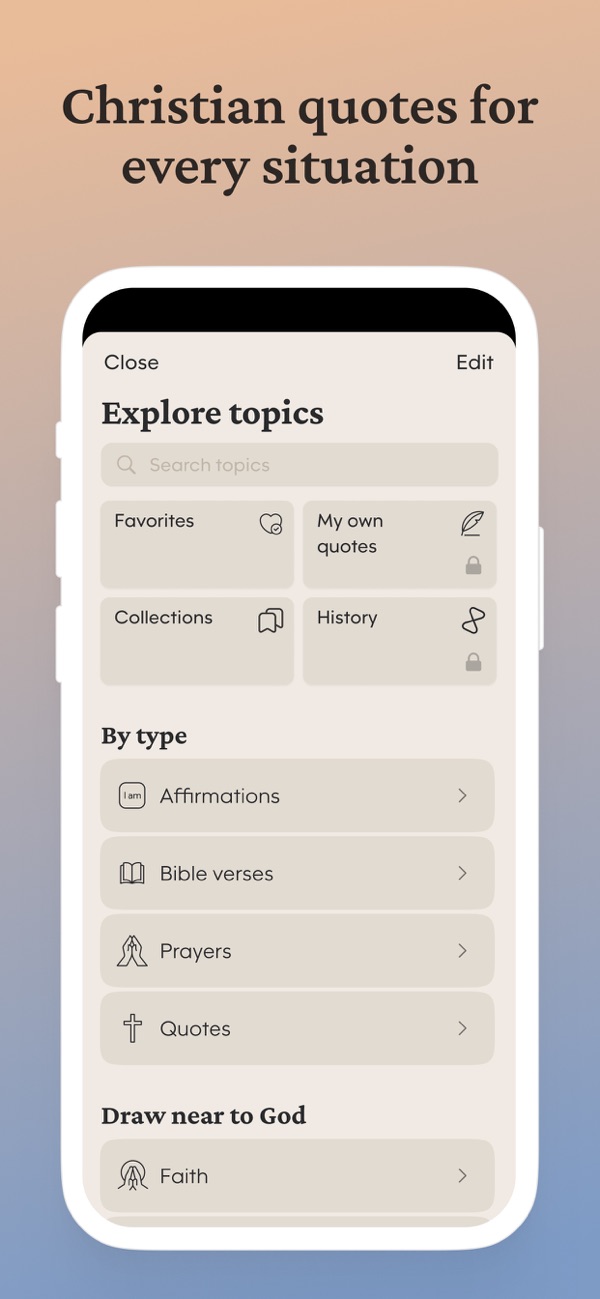
In the app, premium-only items carry a small padlock, as you can see on the Explore screen, so you always know before tapping whether something is part of the free set.
What does Bible Widgets Premium add?
Premium is about depth and personalization: all categories unlocked, the full theme library plus custom themes with your own background photo, advanced widget customization (per-widget themes, borders and refresh frequency), unlimited daily reminders, your own typed quotes and the reading history, and an ad-free experience. It is offered as a yearly or monthly subscription, usually with a free trial, and is managed in your phone's subscription settings.
Free vs. premium, feature by feature
1. Widgets: free
“Home Screen widgets in all three sizes and the iPhone Lock Screen widget, with basic customization. Premium adds per-widget themes, borders and the refresh frequency presets.”
2. Categories: a free set, all with premium
“Bible verses and the core topics are free. Premium unlocks every category in the library, including the more specific ones such as Mental health, Grief and Letting go.”
3. Themes: a free selection, the library with premium
“Free users have a selection of themes plus a rotating Free today pick. Premium opens the full library of light, dark, animated and seasonal themes and lets you create custom themes with your own photo.”
4. Reminders: basic free, unlimited with premium
“Set a daily verse reminder for free. Premium lets you schedule as many reminders as you want through the day.”
5. Favorites, collections and sharing: free
“Save verses with the heart, organize them into collections, and share any verse as an image. All free.”
6. Streaks: free
“The daily streak and the streak widget are part of the free app.”
7. My own quotes and History: premium
“Typing in your own quotes to show in widgets, and the history of what you have read, are premium features, marked with a padlock on the Explore screen.”
8. Ads: shown free, removed with premium
“The free version is supported by ads inside the app. Premium removes them. Widgets themselves never show ads.”
Frequently asked questions
Is there a completely free Bible verse widget in this app?
Yes. The widget, a category, a theme and reminders are all part of the free version. You can run a verse of the day on your Home Screen or Lock Screen without paying.
Does the free version expire?
No. Free is free indefinitely. The free trial that may be offered is for Premium, and if you let it end you return to the free version rather than losing the app.
How do I manage or cancel Premium?
Through your phone's subscription settings (the App Store on iPhone, Google Play on Android). Cancelling returns you to the free version at the end of the period.
Can I try premium themes without subscribing?
The app rotates a Free today theme from the premium set, so you can use a premium theme for the day it is featured.