Aesthetic Bible verse widget ideas: themes, fonts, sizes and layouts that make Scripture part of your Home Screen design, with the settings for each look.
October 13, 2026
·
3 min
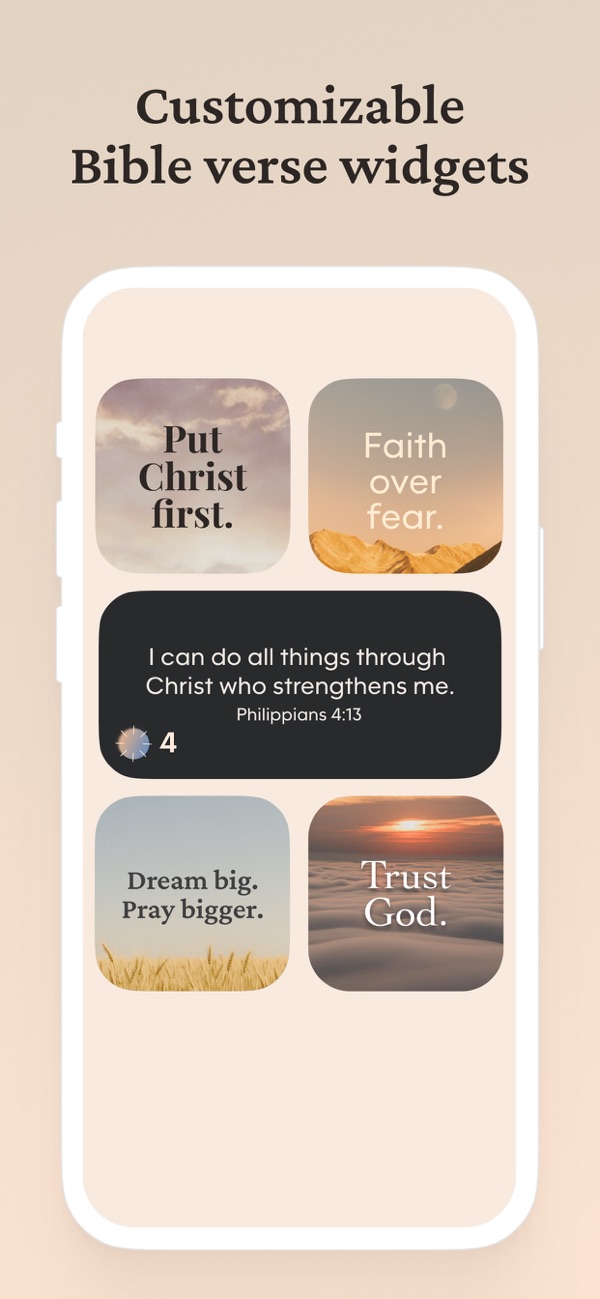
An aesthetic Bible verse widget is one whose theme, font and size were chosen to match the wallpaper and icons around it, so the verse looks like part of the Home Screen rather than a sticker on it. Bible Widgets lets you set a theme per widget, pick the text size, add or remove a border, and choose from animated, light, dark and seasonal themes, which is enough to build any of the looks below.
Here are seven layouts people actually use, from a single soft verse beside the clock to a dark minimalist grid, each with the exact settings to recreate it. You need the free Bible Widgets app; a few of the theme options are premium, and we say which.
What makes a Bible verse widget look aesthetic?
Three choices do most of the work. Theme sets the background and font pairing; a calm photo or gradient with a serif reads as devotional, a plain dark background with a sans-serif reads as minimalist. Size sets the rhythm of the screen: one medium widget anchors a page, four small ones make a grid. Consistency ties it together: match the widget's palette to your wallpaper and keep every widget on a page in the same theme.
Themes are chosen with the paint roller icon on the app's main screen, and each widget can either follow the app theme or keep its own, which is set under Widget settings.
Where do the themes and fonts come from?
Bible Widgets ships a theme library with light, dark, animated and seasonal sets, and a rotating Free today selection that opens a premium theme for the day. Premium unlocks the whole library and lets you create custom themes with your own background photo, which is how the wallpaper-matched looks below are made. Lock Screen widgets have their own font choice, separate from the Home Screen theme.
7 aesthetic Home Screen ideas with Bible verse widgets
1. One soft verse beside the clock
“A single <strong>small</strong> widget on the top row, light cream or pale gradient theme, serif font, no border. Set the category to Bible verses and the frequency to Twice a day. It works with almost any light wallpaper and is the gentlest place to start.”
2. The dark minimalist card
“A <strong>medium</strong> widget on a dark or black theme with white sans-serif text, placed alone on an otherwise empty page with a dark wallpaper. Turn the buttons off and the border off. Reads like a quiet card with one line of Scripture.”
3. A two-by-two grid of short verses
“Four <strong>small</strong> widgets in a square, all on the same theme, each set to a different category: verses, prayers, affirmations, quotes. Give each a name in Widget settings. Frequency Occasionally so the grid changes through the day.”
4. Wallpaper-matched custom theme
“Create a custom theme (premium) using the same photo as your wallpaper, or a crop of it, and put one <strong>large</strong> widget in the middle of the page. The verse appears to float on the wallpaper itself.”
5. Seasonal set
“Switch the widget theme to one of the seasonal themes, for Advent, Easter or autumn, and match the wallpaper to it. Because the theme is set per widget, you can change the look for a season without touching your other pages.”
6. Verse plus prayer pairing
“A medium verse widget above a small prayers widget, both in the same light theme, with a matching Lock Screen widget in the same font. The Lock Screen gives the verse; the Home Screen gives the prayer to carry it.”
7. Animated gradient
“One of the animated themes on a <strong>medium</strong> widget, with the rest of the page kept plain so the slow movement draws the eye. Best on a page you visit once or twice a day rather than your main page.”
Frequently asked questions
Can I use my own photo behind the verse?
Yes, with a custom theme, which is a premium feature. Themes from the built-in library, including some animated and seasonal ones, are available free, with a rotating Free today pick.
Can each widget have a different theme?
Yes. Under Widget settings each widget can follow the app's theme or keep its own, so a dark widget and a light widget can sit on different pages.
Can I change the font?
The font comes with the theme on Home Screen widgets, so you change it by choosing a theme. Lock Screen widgets have a separate font setting.
Does the aesthetic widget work on Android?
Yes. Themes, sizes and categories are the same on Android. Only Lock Screen widgets are iPhone-only.